
Sim racing telemetry and overlay tools, priced and compared
Two jobs get conflated here, and picking the wrong tool for the job is why people stall out.
Telemetry analysis. Post-session: you record a lap, overlay it against a faster one, and find the corner where you’re losing two tenths.
Live overlays. In-race: a delta bar, a relative box, fuel and standings on screen while you drive.
SimHub does neither analysis job well, despite getting recommended for both, because it isn’t an analyzer at all. A third option, a real-time AI coach, reads the same telemetry but talks to you corner by corner while you drive.
Build the free stack first. Every tool here is priced, with the community verdict on each.
Telemetry analysis tools, priced
Section titled “Telemetry analysis tools, priced”| Tool | Price | What it does | Sims |
|---|---|---|---|
| Garage 61 | Free; Pro ~€5/mo billed yearly | Auto-uploads laps, overlays your line and traces vs other drivers | iRacing |
| VRS | Free Casual; $4.99–$9.99/mo | Driving Analyser, pro data packs, Virtual Coach | iRacing (incl. oval, dirt, rallycross) |
| MoTeC i2 Pro | Free | Deep multi-channel analysis, the setup-work tool | iRacing (via Mu), others via workspaces |
| Atlas (McLaren) | Free, via iRacing | Pro multi-channel analysis | iRacing |
| Z1 Analyzer | $3.99–$17.99/mo | 9-trace playback, turn-by-turn lap compare | iRacing, AC, rFactor 1/2, more |
| Second Monitor | Free (open source) | Timing plus per-lap telemetry viewer | AC, ACC, rF2, AMS2, RaceRoom, iRacing |
| ACCReplay | Free | The Garage 61 equivalent for ACC | ACC |
Garage 61 is free and it’s where most people should start. It auto-uploads every lap you turn in iRacing and lets you overlay your throttle, brake, steering, and driving line against thousands of other drivers’ laps on the same track and car. The reference pool is deep enough that there is almost always a faster lap in your car to compare against.
“Download Garage 61. It’s free. Compare your lap times to the fast guys on there. You’ll see their lines, braking, throttle.” (r/iRacing)
Pro is about €5/month billed yearly and adds filtering, telemetry access on other drivers’ laps, and longer data retention. The free tier covers what most drivers need, and it’s iRacing only. Garage 61 has no in-car live telemetry overlay, only post-session analysis plus a live-timing feature.
The catch is picking the right reference. Do not overlay against the absolute fastest hotlap on the board. That lap was likely set by a 5,000+ iRating driver in the coldest, grippiest practice conditions, sometimes on a different track layout. The community’s most-upvoted advice is to pick a ghost roughly a second faster than you in similar conditions and chase that, not the alien. Garage 61 shows each driver’s iRating next to their lap, so picking someone 300 to 500 iRating above you in race-like conditions gives you a delta you can actually copy.
VRS (Virtual Racing School) layers a Driving Analyser, setup packs, and a Virtual Coach on top of the same idea. The free “Casual” tier gets you started with limited comparison time; the Dedicated tier ($4.99/month or $49.99/year) unlocks a single data pack or teammate’s data, and Competitive ($9.99/month or $99.99/year) unlocks all data packs plus side-by-side video. It’s iRacing only but the only major option with full oval, dirt, and rallycross coverage.
The community read is that VRS is “essentially a fancy web-based version” of the free analyzers, worth it for the curated pro data packs and the optional human coaching rather than the telemetry viewer itself. The setups aren’t automatically better than a good iRacing baseline.
MoTeC i2 Pro is the deep, free package, and it’s the one the community calls the gold standard for setup work. iRacing’s .ibt telemetry opens in i2 once converted to MoTeC’s .ld format. The free Mu exporter (a third-party tool by Patrick Moore) watches your telemetry folder and converts automatically, but note it’s unmaintained, last released in 2022, so it’s not an official MoTeC pipeline.
“The big benefit over VRS or G61 is for setup building. You can see logged data like your ride heights to make setups for open series.” (r/iRacing)
Atlas, McLaren Applied’s professional analysis software, is the other free option and downloads straight from the iRacing member site. Drivers split on which to learn, with one camp calling Atlas easier to start and MoTeC more flexible once you climb the curve.
Either exposes logged channels like ride heights, tire temperatures, and suspension travel, what open-setup series actually need. The learning curve is steep, so reach for these after you’ve outgrown line-and-input comparison.
No Garage 61 for ACC. ACC drivers don’t get the auto-upload-and-compare ecosystem; the community substitutes ACCReplay (free, the closest equivalent) or MoTeC directly. Z1 Analyzer ($3.99–$17.99/month, included in every Z1 tier) and the free open-source Second Monitor both cover multiple sims if you race outside iRacing.
iRacing’s native recording writes .ibt files when you toggle telemetry in-sim. They pile up fast, gigabytes per week, and the recurring r/iRacing reminder is to clear the folder periodically; one driver freed 76 GB doing it. Combined with replays (roughly 1 GB per hour), the telemetry and paints folders will quietly swallow tens of gigabytes.
How to actually read a trace
Section titled “How to actually read a trace”Watch the line and distance delta first, not throttle and brake. One meter is roughly 3 feet; anything more than a meter off the reference line is losing time before inputs even enter the picture. A wider, smoother arc that carries speed beats a tighter line you have to scrub off.
Then read the brake-trace shape. A downforce or formula car gives a triangular trace: a near-vertical stab to peak pressure, then a diagonal trail-off as speed and downforce bleed away. A GT car gives a squarer trace: vertical to peak, a held plateau, then a release as you turn in. If your trace doesn’t trail off where the reference’s does, your trail-braking is the lost time.
Last, look at throttle application on exit. Earlier and more progressive to full throttle is the payoff for getting entry right.
Live overlays and HUD, priced
Section titled “Live overlays and HUD, priced”| Tool | Price | What it does | Sims |
|---|---|---|---|
| iRacing native black boxes | Free, built in | F2 fuel, F3 relative, delta, standings | iRacing |
| RaceLab | Free; Pro €4.90/mo (lifetime ~€400) | Relative, standings, fuel, radar, input traces, track map | iRacing, ACC, F1 |
| iOverlay | Free; €4.95/mo or €29.95/yr | Standings, relative, fuel, free track map, spotter bars | iRacing |
| Kapps | Free via linked Twitch/Prime sub | Relative, fuel, standings, nearby SR/iRating | iRacing |
| SimHub | Free donationware (Motion addon €34.99) | Dashes, LEDs, shakers, motion, on-screen overlays | 100+ |
| iRon | Free (open source) | Relative, inputs trace, standings, fuel | iRacing |
iRacing itself already gives you the F3 relative black box (gap to the cars immediately ahead and behind), F2 fuel, an on-screen delta, and standings, all free.
Before you pay for any overlay, weigh the community’s standing advice: iRacing has been steadily rebuilding its native UI and keeps absorbing what overlays sell. It added auto-fuel after RaceLab had it first, and the repeated warning is that the coming UI refresh may break third-party overlays and supply native replacements.
Run the free tiers and native black boxes first, then pay only for the specific layout or feature you still miss, and favor a monthly sub you can cancel over a lifetime purchase.
RaceLab is the polished, beginner-friendly overlay app: delta, relative, standings, radar, input traces, fuel calc, and track map, on iRacing, ACC, and F1. The free tier covers the basics; Pro runs about €4.90/month, and there’s a roughly €400 lifetime tier behind what the community dubbed “the great overlay price gouge.”
“They both work well, but I like the customization of RaceLab.” (r/iRacing)
RaceLab took real reputational damage over surprise billing and moving features behind the paywall, and a wave of users migrated to Kapps and SimHub over it. It’s also the heaviest of the overlays, drawing 3 to 4.5% CPU versus iOverlay’s ~0.4%.
iOverlay is freemium, not paid-only: the free tier includes standings, relative, fuel, and the track map that drivers single out as its killer feature, with premium adding spotter bars, multiclass traffic, and pit helpers for €4.95/month or €29.95/year.
“I don’t see a reason to shift from iOverlay. It gives me everything I need, and the Pro cost is reasonable.” (r/iRacing)
The common pattern on r/iRacing is a hybrid stack, RaceLab or Kapps for relative and radar, iOverlay’s free track map alongside, with the radar called the single most valuable overlay on a single monitor.
Kapps is the free-via-Twitch option and the destination most RaceLab refugees name. You unlock it by linking an Amazon Prime Gaming or Twitch sub to the developer’s channel, and it stays active afterward. The tradeoffs: it shows nearby drivers’ SR and iRating, but its fuel calc updates only per lap (no live fuel), development is largely suspended, and the single-developer hosting has had reliability scares.
SimHub belongs here, not in analysis. It’s a dashboard, LED, bass-shaker, and motion engine that also renders on-screen overlays across 100+ games, with a huge community library of dashes and overlays (the ABS-trace pedal overlay is a perennial favorite). The base app is free donationware (the Motion addon is a separate €34.99 license).
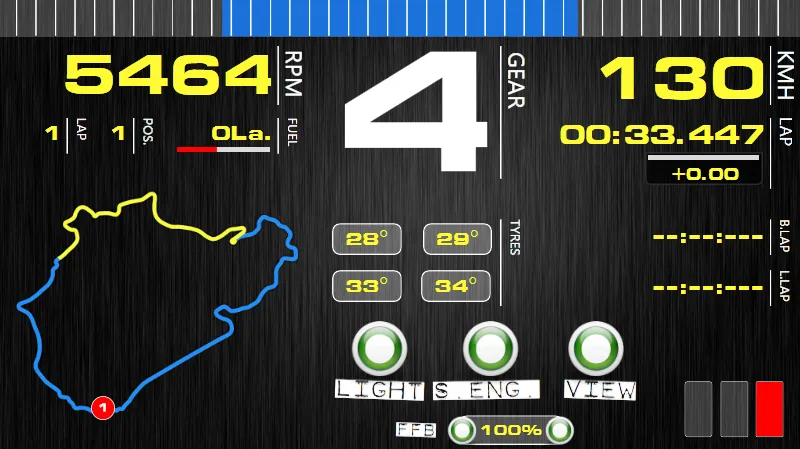
A SimHub dashboard layout. Source: simhubdash.com.
“For wheels with screens, SimHub support is a godsend.” (r/simracing)
The community verdict is consistent: excellent and free for dashes and shakers, and its community overlays beat the paid apps for some jobs, but it will not tell you where you lost a tenth.
For input traces and a lightweight free HUD, iRon (open source: relative, inputs, standings, fuel) and a family of free open-source overlay packs (irdashies, SharpOverlay, RaceOverlay) come up repeatedly.
The standing caution with any live trace: a comparison bar pulls your eyes off the track. The community is split, some call the delta bar their number-one tool for finding time, others say it causes overdriving and incidents, so use it to confirm a habit in practice, then turn it off and do the real fixing in post-session review.
Crew Chief
Section titled “Crew Chief”Crew Chief is a free spotter and race-engineer voice app, and it’s near-universally beloved. It reads fuel, gaps, flags, incidents, and pit windows aloud across iRacing, ACC, AC, rFactor 2, F1, RaceRoom, and Automobilista, so you keep your eyes on the track instead of the relative box.
“Anyone not using Crew Chief is crazy, best free software available for sim racing.” (r/ACCompetizione)
It even warns you about dodgy drivers nearby. Pair it with a relative HUD and it’ll flag slower cars before you reach them. The one caveat the community raises is its fuel calculation, which some drivers stopped trusting after it under-fueled them, covered next.
Why fuel calculators go wrong
Section titled “Why fuel calculators go wrong”Fuel calculators, including iRacing’s auto-fuel, RaceLab’s, and Crew Chief’s, read your recent consumption and extrapolate. They go wrong when your recent laps aren’t representative: fuel-saving laps, a different stint length, or laps under yellow drag the average off. Multiple drivers report a calculator costing them a race by coming up a lap short, and the common fixes are to run a few clean green-flag laps at race pace before trusting the number, then add a margin lap of fuel. iRacing’s own auto-fuel tends to err conservative (over-fueling), which is the safer failure.
What to actually start with
Section titled “What to actually start with”Build the free stack first: Garage 61 for analysis, Crew Chief for audio engineering, iRacing’s native black boxes for live info, and Trading Paints for liveries (free, with a $23.99/year Pro tier for the in-browser paint editor).
From there, add VRS, MoTeC i2, or Atlas when you want deeper analysis, a free overlay like iRon or a community SimHub pack when you want a configurable HUD without a subscription, and SimHub itself when you’ve got a dash or shaker to drive.
FFB-enhancement apps like MAIRA (Marvin’s Awesome iRacing App) and irFFB are a separate category that reshapes force feedback rather than analyzes laps; see MAIRA and irFFB for the wheel-oscillation and crash-protection caveats before you run one. See pedals for getting the brake inputs your traces depend on.
A review workflow that works
Section titled “A review workflow that works”Run a 30 to 45 minute practice block. Then review the telemetry against a realistic reference, and jot two or three plain notes: “wider entry T7,” “earlier to throttle onto the back straight,” “trail brake deeper into the hairpin.” Fix one thing the next session. Reviewing the line and distance delta beats staring at the throttle and brake traces alone, and small written fixes stick better than a vague sense that you were slow. This is the same study loop the creators and further reading page describes: learn a fundamental, copy an onboard, then check your Garage 61 trace against it.
Frequently asked questions
What's the best free telemetry tool?
For iRacing, Garage 61 is the free default and where most drivers start: it auto-uploads your laps and overlays them against thousands of others'. For ACC there's no Garage 61, so the community uses ACCReplay (free) or MoTeC directly. For maximum depth, MoTeC i2 Pro and McLaren's Atlas are both free and ship through iRacing, with a steeper learning curve.
Which comparison lap should I pick in Garage 61?
Do not overlay against the absolute fastest hotlap on the board. Those are often set by 5,000+ iRating drivers in the coldest, grippiest, traffic-free practice conditions. Garage 61 shows each driver's iRating next to their lap, so pick someone roughly a second faster than you in race-like conditions and the delta becomes something you can actually copy. This is the single most-upvoted improvement tip in the iRacing community.
Is there a free overlay that shows my throttle and brake inputs?
Yes. SimHub renders free community input and pedal-trace overlays (the ABS-trace pedal overlay is a perennial favorite), RaceLab's free tier shows input traces, and iRon is a free open-source iRacing overlay with an inputs trace. iRacing's own black boxes do not include an input trace. All three are free.
Should I buy a lifetime or annual overlay subscription?
Probably not. iRacing has been steadily rebuilding its native UI and black boxes, and it keeps absorbing what paid overlays sell (it added auto-fuel after RaceLab did). The community's repeated warning is that a UI update can break third-party overlays and remove the need for them, so favor a free option or a monthly sub you can cancel over RaceLab's ~EUR 400 lifetime tier.
Is SimHub really that important on a wheel?
SimHub is a dashboard, LED, bass-shaker, and motion engine that also renders on-screen overlays, not a telemetry analyzer. The base app is free donationware (the Motion addon is a separate EUR 34.99 license). It's worth it if you have a dash, button-box display, or bass shakers to drive, but it will not tell you where you lost a tenth. Use Garage 61 for that.
Is Kapps a free overlay?
Effectively, but with a catch. Kapps unlocks free if you link an Amazon Prime Gaming or Twitch subscription to its developer's channel, and access persists after the sub lapses. Development is largely suspended and the single-developer hosting has had reliability scares, so treat it as a free-but-unsupported option. SimHub (donationware) and iRon (open source) are free without the Twitch link.